Enable Javascript to access this page. Arena of An Artist
rss
twitter
    Find out what I'm doing, Follow Me :)

Saturday, August 7, 2010

secret backdoors to many websites

Secret Backdoor To Many Websites

Ever experienced this? You ask Google to look something up; the engine returns with a number of finds, but if you try to open the ones with the most promising content, you are confronted with a registration page instead, and the stuff you were looking for will not be revealed to you unless you agree to a credit card transaction first....
The lesson you should have learned here is: Obviously Google can go where you can't.

Can we solve this problem? Yes, we can. We merely have to convince the site we want to enter, that WE ARE GOOGLE.
In fact, many sites that force users to register or even pay in order to search and use their content, leave a backdoor open for the Googlebot, because a prominent presence in Google searches is known to generate sales leads, site hits and exposure.
Examples of such sites are Windows Magazine, .Net Magazine, Nature, and many, many newspapers around the globe.
How then, can you disguise yourself as a Googlebot? Quite simple: by changing your browser's User Agent. Copy the following code segment and paste it into a fresh notepad file. Save it as Useragent.reg and merge it into your registry.

CODE:

Windows Registry Editor Version 5.00
[HKEY_LOCAL_MACHINE\SOFTWARE\Microsoft\Windows\CurrentVersion\Internet Settings\5.0\User Agent]
@="Googlebot/2.1"
"Compatible"="+http://www.googlebot.com/bot.html"


Voila! You're done!

You may always change it back again.... I know only one site that uses you User Agent to establish your eligability to use its services, and that's the Windows Update site...
To restore the IE6 User Agent, save the following code to NormalAgent.reg and merge with your registry:

CODE:

Windows Registry Editor Version 5.00
[HKEY_LOCAL_MACHINE\SOFTWARE\Microsoft\Windows\CurrentVersion\Internet Settings\5.0\User Agent]
@="Mozilla/4.0 (compatible; MSIE 6.0; Windows NT 5.1)"

Ps:
Opera allows for on-the-fly switching of User Agents through its "Browser Identification" function, while for Mozilla/FireFox browsers a switching utility is available as an installable extension

Hack Website Using DNN [Dot Net Nuke] Exploit

Hack Website Using DNN [Dot Net Nuke] Exploit

Note:- Only for educational purpose
Using google DORK try to find the vulnerable website.

inurl:"/portals/0"

You can also modify this google dork according to your need & requirement
I have found these 2 website vulnerable to this attack:
http://www.wittur.se/

http://www.bsd405.org/


n00bs can also try both of these websites for testing purpose.
Open the home page and check any image which is located in /portals/0/
Check the location of the image. It should be located in /portals/0/

For e.g. in case of  http://www.wittur.se ..the image is located at location- http*://www.wittur.se/Portals/0/SHM.jpg*
Waaooo it means this website is vulnerable and we can change the front page pic. Now the current image name is SHM.jpg.
Rename the new image as SHM.jpg which you want to upload as a proof of you owned the system.

Now here is the exploit
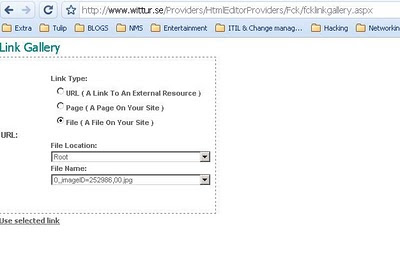
Providers/HtmlEditorProviders/Fck/fcklinkgallery.aspxHOW TO RUN ?
Simply copy paste it as shown below:

www.site.com/Providers/HtmlEditorProviders/Fck/fcklinkgallery.aspx

You will see the portal where it will ask you to upload. Select the third option File ( A File On Your Site
After selecting the third option, replace the URL bar with below script

For script click here http://tinypaste.com/af8b9

After running this JAVA script, you will see the option for Upload Selected File Now select you image file which you have renamed as SHM.jpg & upload here. Go to main page and refresh...BINGGOOOOOOOOOOOO you have hacked the website.


Increase your adsense earning : MUST READ

What is Adsense Revenue Sharing Program
This method is particularly useful for those people who dont have a running blog so couldn't get much through adsense.This method is called Adsense Revenue Sharing program.


Have already heard anything about Revenue Sharing Sites?
Revenue Sharing Sites are sites which place ads (particularly from adsense) of its members throughout its website. The site ads and the member’s ads impressions will be divided according to the site’s rules. Revenue Sharing Sites can be a Social networking, Forum or Article Marketing Website.

Does it violate TOS of Adsense?As of now, I haven’t found any conflicts of this concept to the TOS of Adsense. If you are worried that this might be an illegal way of earning in adsense then as of now, it is not directly define in any sentences within the TOS of adsense. There are a lot of Revenue Sharing sites that exist for a very long time now. A very popular Revenue Sharing Forum Site is the DP or Digital Points. DP is doing this concept for how many days and months still, there are no reports from its members of getting suspended by adsense because of joining the site. Getting to Know Revenue Sharing Sites As I have said, this kind of site can be in form of forum, social networking or article submission site. Adsense, as we all know can pay you by the number of page impression who have made with their adsense placing on it. In a forum revenue sharing site, it works based on your activity. If you post messages on discussions or making your own discussions, everytime a visitor hits and read that page and your ads is currently in display, you have a great chance on earning from it. The key on this kind of forum sites is to be active and make discussions that are interesting. For social networking site, it works when someone view your profile. Some other sites would offer a random placing of ads on the top of their every page. For article submission sites, it works when someone view your article. The ads will match to the article that you have made, so the possibility of ads getting click by the reader is very high.


If you are an adsense user and you think that your blog or website traffic is not enough to make a good traffic to earn with your adsense, you may want to try on joining to this Revenue Sharing Sites.

Increase your adsense earning through revenue sharing

Step1. First of all create an account on www.yousaytoo.com

Step 2. During registration, they will ask for ur adsense ID, you will get this id from ur adsense account. It looks like this pub-32323433230230 . Just copy and paste it there.

Step 3. Now create a blog on yousaytoo.com and post more and more topics,whoever read ur blog and make click on the ads ,you will be rewarded in the adsense.

Its really easy way to earn as yousaytoo has huge traffic . I m earning 2-3 $ daily in this way.


How will i know how much i have earned ?

We don't have such information. You need to login to your Google AdSense and/or Amazon affiliate accounts to find out how much you've earned.


You can track your earnings from Google AdSense on YouSayToo by adding a new URL channel in your Google AdSense account. To do that, login to your AdSense account and go to AdSense Setup --> Channels then go to URL channels and add a new URL channel www.yousaytoo.com


All revenue sharing sites have their policies like some sites have 50% ads policy,which means if you have make a post on some revenue sharing site and there are 20 clicks on the ads then 10 goes to your account and 10 goes to the webmaster.
Some sites have 75% policy means 3 out of 4 are yours and some also have 100 % .

ENJOY..!